Monday morning. I open my to-do list and get to work on the 12 tasks that are due today… Fast forward 9 hours… At the end of the day I look at a list that is only a good third done. I finished just 5 things and my head is completely done for the day. It does not feel good. I should have managed all 12 tasks. Or at least more than half.
What to-do lists are good at
I love to-do lists. They give a wonderful overview of everything you have to do, should do or might like to do. They make the unclear clear. Once an entry exists, you can look it up at any time and no longer have to keep it in your head. And then the feeling when you tick something off: nice, I got something done again. Yes, I really do love to-do lists.
The problem: the list does not show how big a task is
But these lists also have a real drawback: a to-do list never shows you how big a task really is. Sure, maybe you estimated the size of a task and it is shown somewhere as a time, but it is still just one simple entry in a long list. That makes it hard to see which to-dos are done quickly and which need a lot more time. In the example above, the 5 tasks I finished were exactly the ones that took the most time. If I had finished only 1 of those and 7 of the smaller ones, the feeling at the end would probably have been a different one.
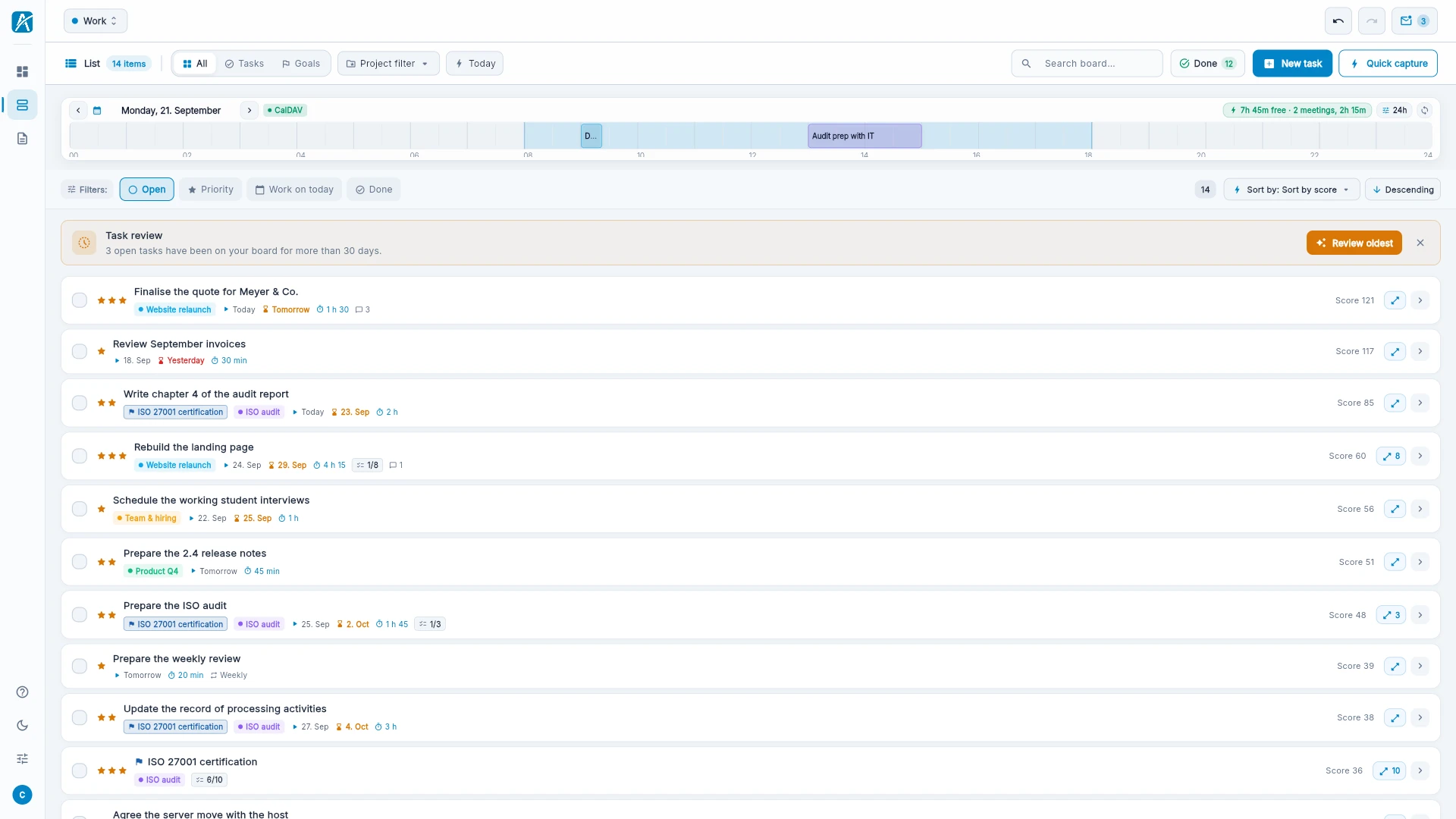
Working days like this quickly feel overwhelming, especially when you cannot tell which task is big, which is small and what really fits into the day. At this point everyone will say it is important to break big tasks down into smaller ones. Yes, absolutely right - but first you have to see what is big and what is small, what is a short call and what is a large project. So you plan your day by the number of tasks, without keeping an eye on the time.
What helps: estimate the effort and start with the big tasks
As I said at the start, it already helps when the estimated effort is written down somewhere - even just as a number. If you look at it every day and break the big tasks down into smaller ones, that is a start. Also not to be underestimated: getting small things done and ticking off lots of tasks feels great - happiness hormones are released, you think you are productive. But the big tasks, which were perhaps the important ones, are still sitting there undone. That is why it is important, now and then, not to start with the small stuff but with the big, complex topic. Breaking it down into smaller pieces can bring that good feeling here too - but you have to do it.
My solution: the size of the task shows the effort
How did I solve it? I built Aevo and did one thing differently from the apps I know: instead of a list or a Kanban board, Aevo has a board with tiles of different sizes. The 15-minute task is small, the 2-hour task is very big. A calculation also puts the important tasks at the top left and the least important ones on the far right - the board scrolls.
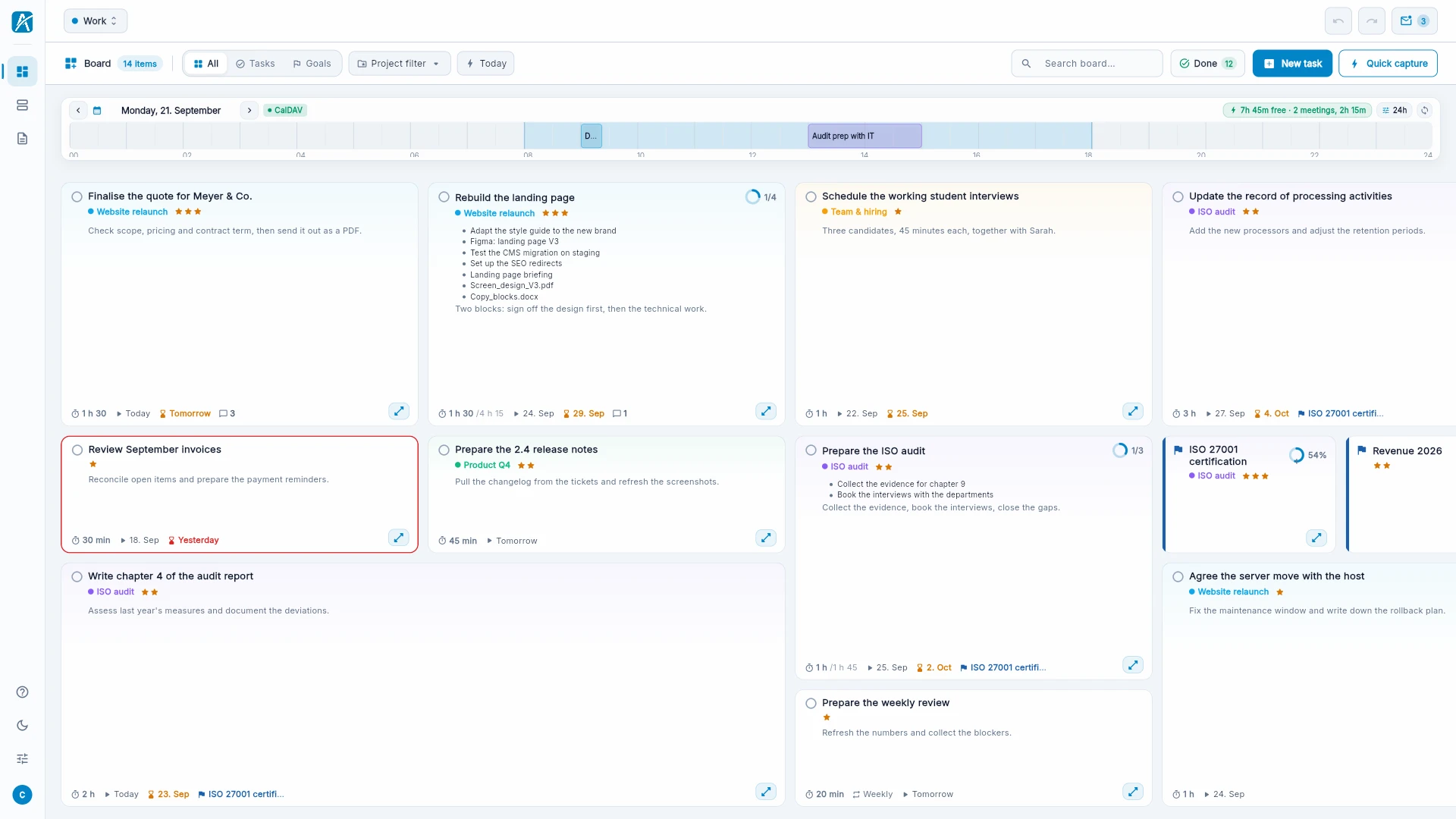
This way, at the start of a day, I see at once which small and big tasks are waiting for me and in which order I should do them. I can also see what might fit into the day. But I do not have to plan, I can just start. One helpful thing: if I created subtasks for a big task and want to do them on different days, the board only shows the size of the part I should do today. That makes the day manageable again.
Conclusion
I think the goal of a good overview can be reached with many different models. For me it is important to see not only the priority, the order in which I should tackle tasks, but also the size of a task. It gives me a better overview. And with Aevo I built exactly that. And what can I say - it works for me.
Want to try it? Go ahead, it is free.