Free
Every tile’s score opens up
One click on the score shows what it is made of: deadline or work-on date, priority, postponements and how long the task has sat untouched. For tasks with subtasks, the most important subtask counts.
Features
From the board and the zoom view to the text message that becomes a task. The sequences below are built like the app. Each feature says whether it belongs to Free or Pro.
Board
A tile’s size comes from your effort estimate. Its position comes from a score built from deadline, date, priority and postponements. What matters now sits top left, even if it is not urgent yet.
Prioritising tasks without sorting every morning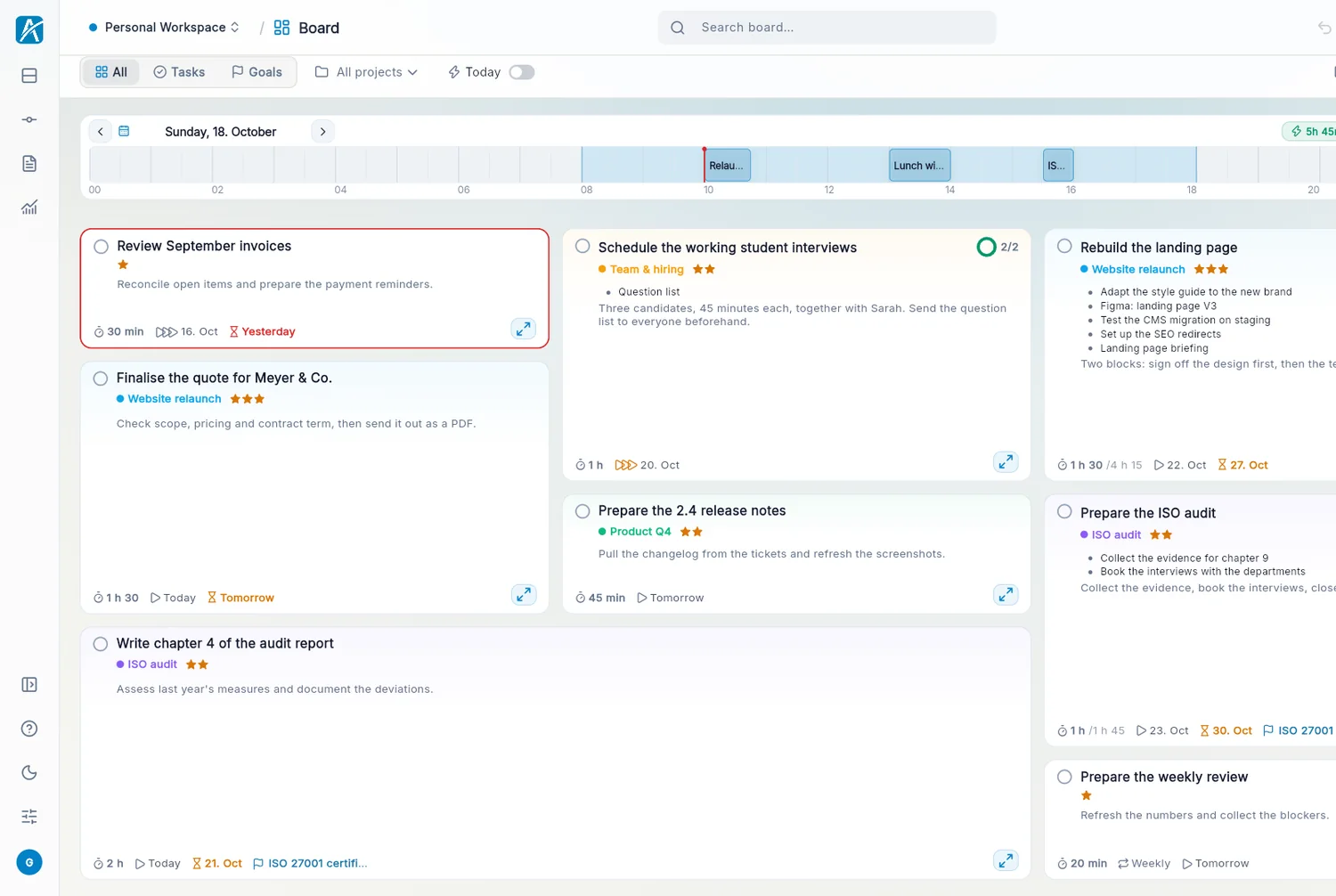
One click on the score shows what it is made of: deadline or work-on date, priority, postponements and how long the task has sat untouched. For tasks with subtasks, the most important subtask counts.
Zoom view
In the zoom view you break a task into subtasks, as deep as you need. You drag subtasks into named groups. Drop a card on the empty area and a new group appears. The levels above stay visible as a rim.
Nested subtasks, as deep as you needA goal collects the tasks that move it forward. Tick one off and the actual line rises. Next to it you see the target pace up to the end date and a forecast for your current pace.
Instead of tasks, progress can also follow a measured value, such as kilometres or kilograms.
What fits today
Aevo subtracts your meetings from your working hours and compares what is left with the effort of your tasks. What still fits today sits inside the line. The rest stays visible, just outside.
Realistic day planningMeetings stay fixed, you drag tasks into the gaps. What does not fit before a meeting carries on after it. Today is included in Free, the three days after it in Pro.
Try the day plan on the home pageAevo reads your calendars and puts the meetings into the day plan. One click turns a meeting into a task.
Google Calendar, Microsoft 365 and CalDAVCapture
You confirm your mobile number once, then text tasks to the Aevo number. The task goes into the workspace you picked in the settings.
Shorthands in the message are read: by fri sets the deadline, 1h the effort, !! the priority. A second line becomes a note.
Aevo reads your mailbox through IMAP or Microsoft 365. When you turn an email into a task, Aevo looks for links and attachments. You tick what should come along, and it is attached to the task.
An email can become a note the same way.
Turn an email into a taskIn quick capture, Aevo colours every word that becomes a property. by 20.11. sets the deadline, /Clients the project, #Offer a tag, !! the priority and 1h the effort. The rest becomes the title.
friday sets the day you work on it, +goal links it to a goal. The same shorthands work in text messages and in the Shortcut.
The Aevo Shortcut creates tasks through Siri, the Action button or the Share menu, without opening the app. It understands the same shorthands as quick capture.
Link
You write notes in the notes studio with folders and Markdown. In a task’s detail view you link it to a note, another task or a project. The link shows on both sides.
Tasks and notes in one appA link can also express an order. If a task waits for another one, it counts as blocked until the other one is done.
Drag files onto the task, up to 10 MB per file. PDFs and images open in a preview, no download needed.
Follow through
Every postponement is counted and adds 4 points to the task, up to 20. So it moves forward instead of quietly slipping back. From the third time on, the tile changes colour. On the fifth, Aevo asks whether the task still matters.
Tasks you keep postponingEvery few days, weeks, months or years. You choose whether the next date is fixed in the calendar or counts from the day you completed the task.
On a task you set when you want to be reminded. The reminder arrives as an email.
Velocity shows how much of your free time you actually turn into completed tasks, week by week. If you like, the board calculates with it. Insights show deadlines that no longer fit, deadlines kept and what you often postpone.
Workspaces & data
Clients, volunteering and private life each on a board of their own. Free has one workspace, Pro as many as you need.
Task management for freelancersThe Aevo servers run in the EU, and the app has no analytics or advertising services. You can export your content as JSON, CSV or Markdown.
Task management and GDPRThe demo runs in the browser without an account. New accounts get 14 days of Pro, no payment details needed.